


- The second iOS 26.1 beta is out now
- It includes a redesigned alarm screen that requires a swipe to turn alarms off
- Other changes include custom workouts and a toggle to automatically download security improvements
Missing an alarm is never fun, and with the iOS 26.1 update, it looks like Apple is going to reduce the chances of you doing so.
The second iOS 26.1 beta is out now, and MacRumors has found that – among other things – it changes the design of the alarm screen, so that rather than just having to tap a button to turn the alarm off, you have to swipe across the screen.
It’s a change that should mean you have to be more awake to actually switch the alarm off, and it also means you won’t accidentally turn it off if you simply wanted to snooze it (the action for which was and remains a simple tap).
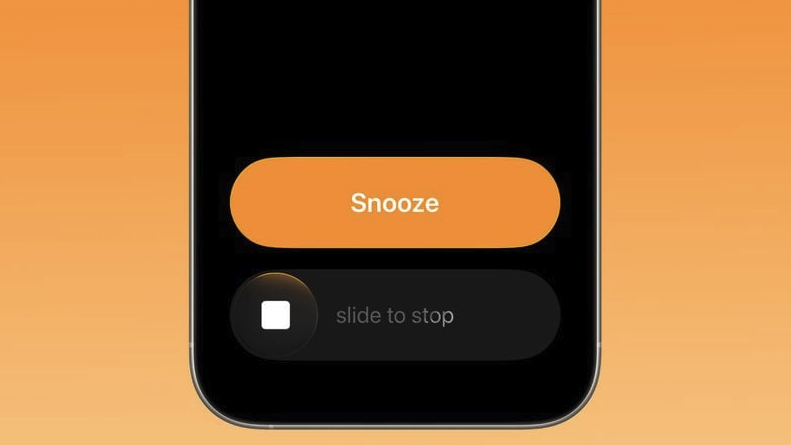
This same slide-to-stop design is also being used by timers in iOS 26.1 beta 2 – it’s probably less necessary there, but could still come in handy, and keeps the interface consistent.
Of course, this being a beta, it’s possible that Apple will further change things – or revert back to the current alarm screen – for the finished iOS 26.1 release, but this seems an obvious improvement, so we’d be surprised if it didn’t roll out.
New features and visual tweaks
And this isn’t the only change in the latest iOS 26.1 beta. Other updates include the ability to make custom workouts in the Fitness app, and a new toggle on the Settings screen to automatically download and install security improvements.
Most of the other changes are visual rather than functional. For example, there are changes to the alignment of some of the headings and images in the Settings app, folder names being aligned to the left rather than the center when you open them, and iOS 26-themed wallpapers being shown in the Display section of the Settings app, rather than iOS 18 ones.
So, this isn’t the biggest update, but the alarm changes in particular could make a huge difference to some users.
If you want to download the iOS 26.1 beta, you first need to sign up for betas on the Apple beta software page if you haven’t already, and then head to Settings> General> Software Update> Beta Updates to download the latest beta on your iPhone.
Of course, the usual warnings apply – beta software is unfinished and potentially unstable, so it’s not for everyone. We’d expect iOS 26.1 to exit beta in the next few weeks anyway, so you shouldn’t have too long to wait for a stable release.
Follow TechRadar on Google News and add us as a preferred source to get our expert news, reviews, and opinion in your feeds. Make sure to click the Follow button!
And of course you can also follow TechRadar on TikTok for news, reviews, unboxings in video form, and get regular updates from us on WhatsApp too.